HTML: All Papers (except Editorials and News)¶
1. Title¶
1.1. Check title spelling.
1.2. Check that following Latin terms are written in italics: in vivo, in vitro, in utero, in situ.
For other Latin terms either italics or plain text is acceptable.

2. Affiliations¶
2.1. Check spelling of English words only
2.2. Check that there are NO street addresses and house numbers included in affiliation
2.3. Check that country and city names are present in affiliation
2.4. Check that country and city names are NOT written in ALL CAPS (capital letters)
2.5. Check that each affiliation number has only one complete affiliation.
One affiliation – one number.
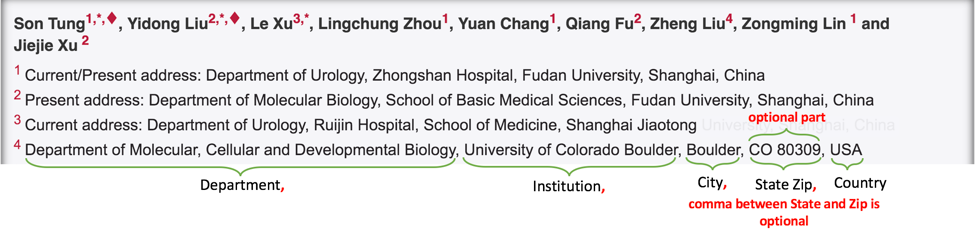
2.6. Occasionally affiliations can contain “Current/Present address:” title. If it is present, check that it has a separate affiliation number and that is followed by colon (:).
One address - one affiliation number.
All acceptable combinations of “Current/Present address” are depicted on the screenshot below:

2.7. Check that only commas are used to separate parts of affiliations (i.e. department, institution, etc.).
2.8. Check that first word of Author Notes starts with a capital letter.
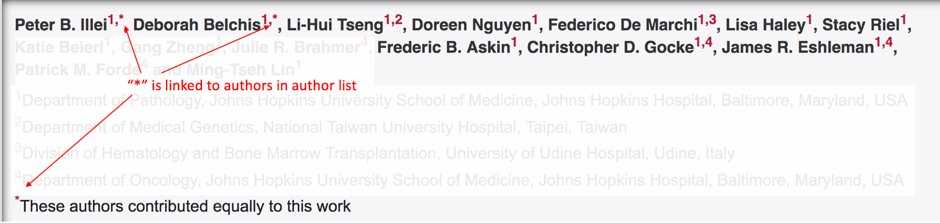
2.9. Check that Author Notes are preceded by a symbol (or group of symbols).
Most used symbols are: *, †, +, #, $, **, ***

2.10. Check that Author Notes symbol is linked to author(s) in the author list.
3. Correspondence¶
3.1. Check that correspondence section has a title “Correspondence to:” (starts with capital letter and followed by colon (:))
3.2. There can be one or more correspondence lines in this section. Check that correspondence line format is in-line with one on the screenshot below:

3.3. Check that Author FullName does NOT contain titles and/or degrees (e.g. Dr., Ph.D., M.D., etc.)
3.4. Check that email address is hyperlinked
3.5. Check that Author FullName matches corresponding name in the author list (including the middle initials if any)

4. Keywords¶
4.1. Check that Keywords section has a title “Keywords:” (starts with capital letter and followed by colon (:))
4.2. Check that keywords are separated either by , (comma) or by ; (semicolon) and two styles are not mixed

4.3. Check that article (except for Special Section articles - see below) has at least 1 and not more than 5 keywords
4.4. Have a look at TOC Section Title to check whether article belongs to special section. If Section Title contains any of the words in “Special Section” column of the table below, then it belongs to the Special Section

If article belongs to Special Section, then in addition to 5 general keywords article must have ALL special-section-related keywords. Corresponding keywords you can find in the table below.
| Special Section | Keywords |
|---|---|
| Pathology | Pathology |
| Chromosome | Chromosome |
| Gerotarget (Focus on Aging) | Gerotarget |
| Autophagy | Autophagy |
| Neuroscience | Neuroscience |
| Immunology | Immunology |
5. Dates¶
5.1. Check that Dates section has titles “Received:”, “Accepted:”, “Published:” (start with capital letter and followed by colon (:))
5.2. Check that month is spelled out as a word and dates are in-line with the following format: Month Day, Year (e.g. June 01, 2017, April 12, 2016, December 31, 2015, etc.)
5.3. Check spelling of the month

Note
We no longer check Published date. It should be left blank. However, if you see date there, please ignore it.
5.4. Check that Received date is older than Accepted date (i.e. we cannot publish before we accept).
Note
Pay attention to years.
6. Callouts¶
6.1. Check whether there is one callout for each of the references in the article text. Callout can be a number, set of numbers divided by comma or a range of numbers separated by hyphen, wrapped in sqare brakets. Callout should be hyperlinked to the corresponding reference.
Here are exmples of callouts: [1] [2, 3, 4] [5-7] [1, 3, 7, 8-10]. See also screenshot below.

6.2. Check that there are no callouts for non-existing references (i.e. there is a callout, but there is no reference).

7. Author List (applicable to all journals)¶
Important
This section contains checks which are applicable to the references to all journals (including in-house ones).
7.1. Check that author names in the List of Authors are in-line with the following format:
LastName INITIALS optional Suffix (e.g. Sr, Jr, 2nd, 3rd, 4th)
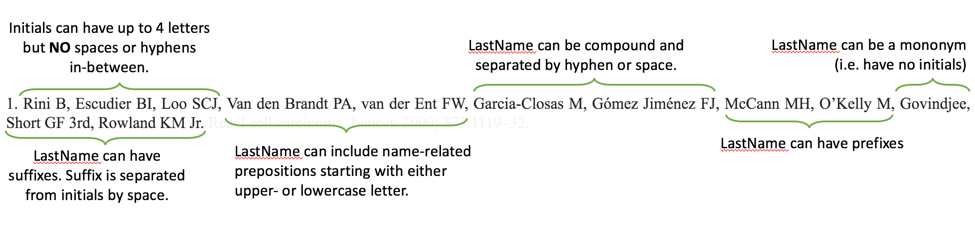
7.2. Check that initials have no more than 4 letters and have NO hyphens or spaces in-between.
7.3. Check all the mononyms (names which have no initials) to be “true” mononyms (check PubMed site).
7.4. Check that List of Authors contains no more than either:
- 13 authors followed by “et al.” OR
- 14 authors


7.5. Check that authors are separated by comma (,) followed by space.
7.6. Check that et al is separated from List of Authors by comma (,)
7.7. Check that there is a dot (.) after last author in the List of Authors or after et al (if it is present).
7.8. List of Authors can contain Group Authorship (see screenshot below). Check that Group Authorship is positioned at the end of List of Authors. Other positions are not allowed.
7.9. If Group Authorship follows List of Authors, check whether it is separated either by comma (,) or semicolon (;). Group Authorship is not counted against total number of authors in the author quota.




8. Citation-Data (in-house journals ONLY)¶
Important
This section is applicable ONLY to the references to in-house journals: Oncotarget, Oncoscience, Aging (Albany NY), Genes Cancer
8.1. Check that title of in-house journal is written correctly: Oncotarget, Oncoscience, Aging (Albany NY), Genes Cancer
8.2.Check that journal citation-data has the following elements in this order:
JournalTitle. year; volume: pages. DOI.
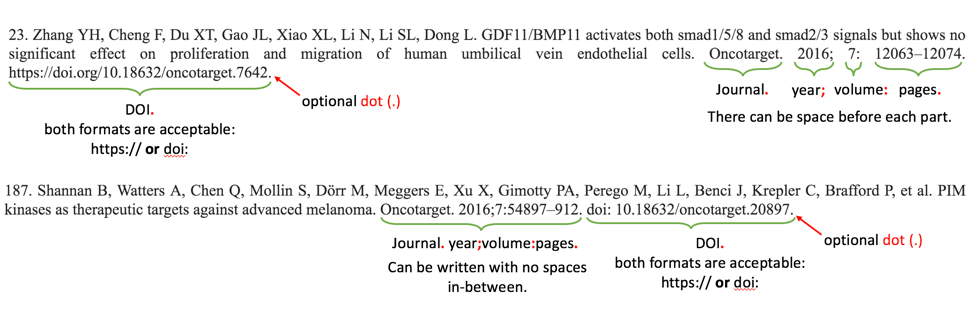
- JournalTitle should be followed by dot (.)
- Year should be followed by semicolon (;)
- Volume should be followed by colon (:)
- Page numbers should be followed by dot (.)
- Space is allowed (but not mandatory) after semicolon and colon. Space is mandatory after both (JournalName and page numbers) dots. Other spaces are not allowed.
- Page number range can be written either in full (12063-12074) or in shorten format (12063-74). Both formats are allowed.
- Both DOI formats (https:// or doi:) are allowed. Dot (.) at the end of DOI is optional.
8.3. Check that all elements of citation-data are present.
8.4. Check that DOI is present. If DOI is missing, then suggest correction to include DOI in the format which is used for other references of the article. Mixing DOI formats is not allowed.
8.5. Check that DOI is complete (resolve, if in doubt) and does not contain spaces.
8.6. Check that citation-data does not contain other elements (i.e. issue number, [pii], [internet])
8.7. There can be references to the articles in Advance Publications (ahead of print). They can be distinguished by having full date (2016 Jul 19) instead of year and/or having [Epub ahead of print] note (see image below).

Check whether those references were moved from Advance Publications section to the specific issue and have full-citation data available.
- Go to corresponding article page on Oncotarget site (either use search or resolve DOI)
- Check whether article page contains full citation-data (year; volume: pages).
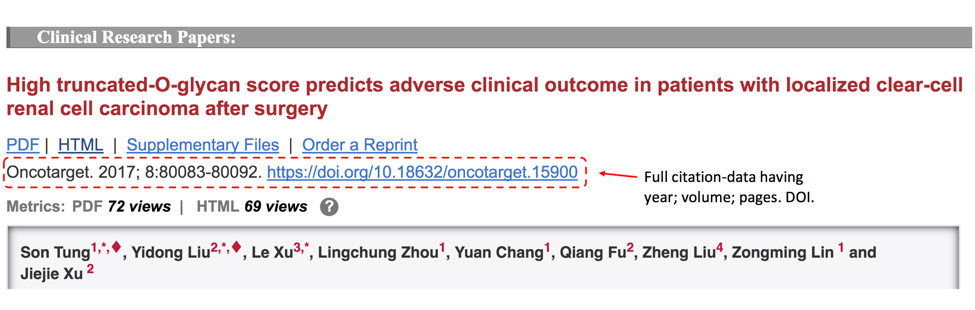
- If full citation-data is present, then suggest correction to include full citation-data to the reference.
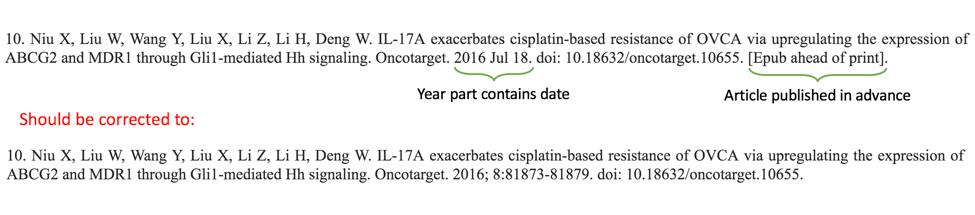
OR
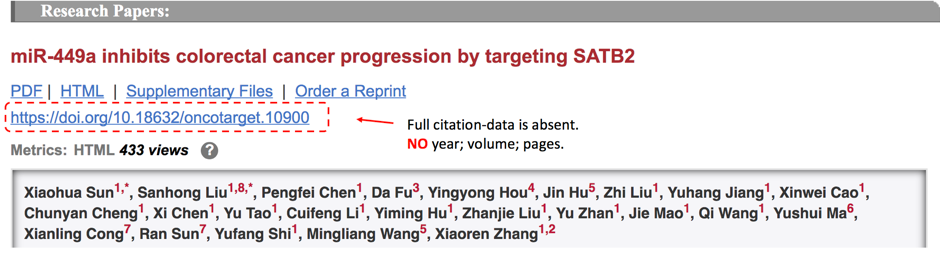
- If full citation-data is not present on article page, then leave references as it is. No action is necessary.